Zum Inhalt springen

Schlagwort: nsp

Goldleaf v0.3

Nintendo Switch, Nintendo Switch: Update ,

Diese Version unterstützt die offizielle Software-Tastatur und ermöglicht das Erstellen von neuen leeren Dateien und Ordnern mit L und R im Dateibrowser. Die PRODINFO-Partition kann durchsucht werden und die keys.dat wird nun aus dem Ordner "SD://switch/" gelesen. Außerdem wurden zahlreiche Fehler behoben, und installierte Titel lassen sich als NSP dumpen.

Ein Account-Manager zum Löschen und Umbenennen von Accounts so wie zum Ersetzen des User-Icons ist auch mit an Board – letzteres empfehlen wir aber nicht, da es zu einem Bann kommen wird. Wer die NSP installiert kann außerdem auch den internen Web-Browser der Switch aufrufen!

Changelog

* Now it's checked that the base folders inside "sd:/goldleaf" are created before entering certain menus.
* File browsers won't refresh the current directory's contents after copying a file as it was pointless and caused delay.
* This version of Goldleaf supports libnx v2.0.0, which fixed a few bugs with USB, and also added native keyboard support.
* Now files and directories can be renamed in file browsers using the native keyboard.
* Now new files or directories can be created (files will be empty) by pressing L (for files) or R (for directories) in a file browser.
* Now the star feature, NSP dumping! This is quite experimental though, and could be unstable. Be careful using it!
* Another console memory partition can be browsed appart from the three others: PRODINFOF
* Brief information about the different partitions is displayed when selecting the console memory browser.
* The path of the key file has been moved from "sd:/goldleaf/" to "sd:/switch/" as other homebrews use this path.
* After removing tickets no dialog will be shown, the footer will inform of the process instead.
* The top part of Goldleaf has been redesigned, which has a mini-text for the current menu. (e.g. current directory in SD card or console memory browsers)
* A warning dialog is displayed selecting USB installation as it's quite unstable for the moment.
* Fixed small bugs with SD card NSP installation.
* Now file/directory copying has a progress bar to follow the copy process, instead of freezing the UI.
* WEB BROWSER! Yeah, you've read right, Goldleaf is the first homebrew tool to provide support for the console's internal browser.
* Account manager! You can replace user's icon, delete them or rename them. Anyway, replacing the icon can be dangerous and banbait!
* Now no cert files are required to install a ticket, not even with NSP installs or USB installs. Goldleaf contains the public cert directly.
* Minor fixes on several dialogs and texts.
SX Installer v1.2

Nintendo Switch, Nintendo Switch: Update , , ,

Probleme mit Speicherstand-Backups wurden behoben, die allgemeine Stabilität verbessert und der Speicherverbrauch um ~30% reduziert. Auch wurden ein Hex-Viewer und ein NSP-Dumper hinzugefügt. Letzterer kann installierte Spiele als NSP dumpen – ist das Spiel allerdings größer als 4 Gigabyte, kann es nicht auf FAT32-Partitionen gesichert werden.

* Fixed save games not backing up sub directories
* Fixed save game restore.
* Fixed nut server installations.
* Fixed touch screen on some screens.
* Reduced memory consumption by ~30%.
* Improved stability of nut USB installs.
* Improved usbhdd stability.
* Added hex viewer to file browser.
* Added ability to dump installed eShop games to NSP (ftp, usbhdd, SD).
* Please be mindful that games larger than 4GB cannot be dumped to fat32 file systems.
* General system stability improvements to enhance the user's experience.

SX Installer v1.1

Nintendo Switch, Nintendo Switch: Update , ,

Das Löschen von NSPs nach der Installation funktioniert wieder und einige andere Dateisystem-Operationen wurden behoben. Des Weiteren lassen sich jetzt Speicherstände sichern, auch auf einem FTP-Server und einer angeschlossenen USB-Festplatte (nur SX OS). Der Touchscreen funktioniert nun auch überall und Bilder der Spiele lassen sich vorabladen – wer die alte Version verwendet hat, sollte die Verzeichnisse "/switch/sx/cache" und "/switch/sx/icons" löschen.

Changelog

* Fixed "delete after install"
* Fixed file browser copy progress bar.
* File browser delete now works for SD, FTP, and USB HDD.
* File browser rename now works for SD and FTP.
* File browser can now write to SD, FTP, and USB HDD, so files can be copied to FTP and USB HDD now.
* Single click back up all game saves!
* Added Touch Screen support everywhere!
* Added ability to preload meta images.
* Images are now stored in image database files, as some fat32 users ran into SD card issues with the sheer number of image files before. /switch/sx/cache/ and /switch/sx/icons/ can now be deleted.
* Added support for backing up and restoring game saves.
* There is an option to specify the game save backup directory, which supports SD, FTP, and USB HDD. So you can backup and restore your save games from across the network or from your hard drive.
* Improved stability for network installs.
* Improved translations for ZH, NL, and RU.
* Added confirmation dialog for deleting files.

Goldleaf v0.2

Nintendo Switch, Nintendo Switch: Update , ,

Die zufälligen Abstürze beim Navigieren der Menüs und des Dateisystems sollten behoben sein und die Keydatei für NCAs und Themes kann auch "keys.dat", "prod.keys", "keys.txt" oder "keys.ini" heißen. Auch wurde ein Bug bei der Theme-Installation gefixt, wenn qlaunch nicht extrahiert wurde und Themes für die Userseite lassen sich nun installieren.

* Supposedly, now those random crashes browsing menus or filesystems are fixed now.
* When looking for the key file for NCAs or themes, now more names are sopported (not just keys.dat): keys.dat, prod.keys, keys.txt or keys.ini.
* Fixed bug which would not install the selected theme if qlaunch was not extracted, and it would just extract it without processing the theme.
* Now title 0100000000001013 is installed to qlaunch directory, previously user page themes wouldn't work for this issue.

Tinfoil heißt jetzt Goldleaf

Nintendo Switch, Nintendo Switch: Neu , , ,

XorTroll hat Tinfoil von Grund auf neu geschrieben und nun die erste Version von Goldleaf veröffentlicht! Und das Tool kann sich sehen lassen!

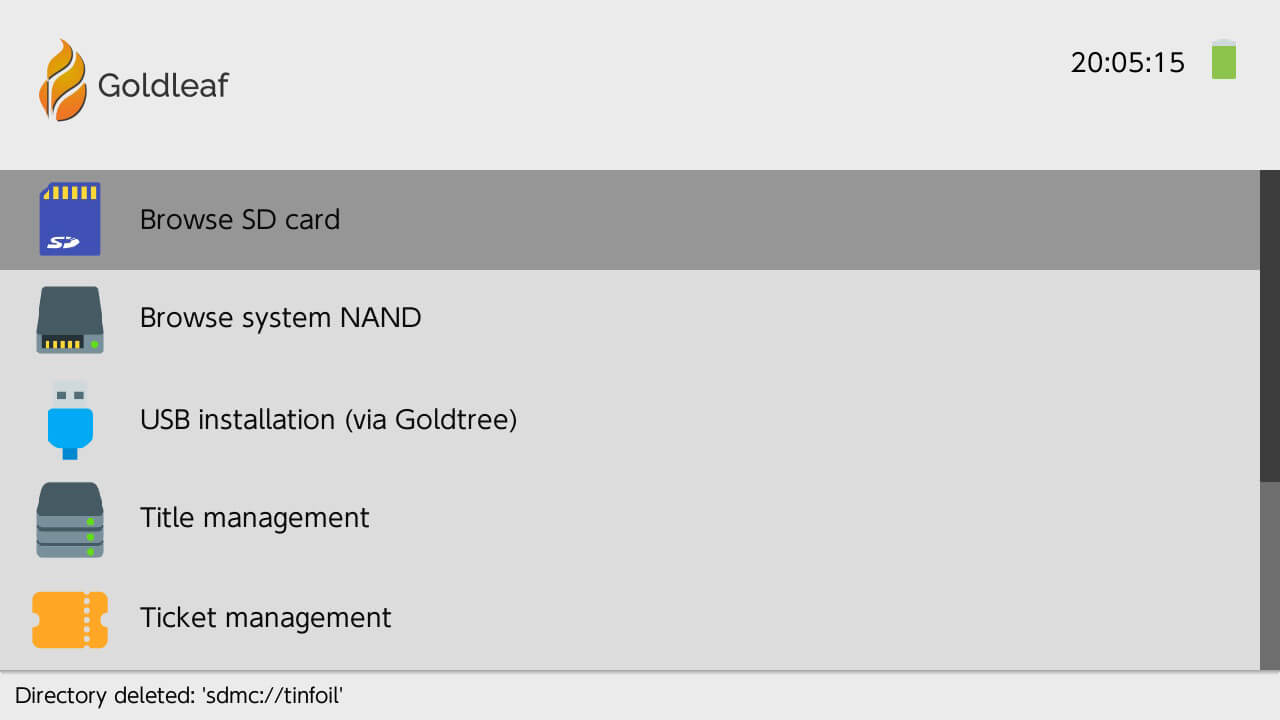
So gibt es jetzt einen integrierten Dateibrowser und eine hübsche, grafische Oberfläche. Auch wurde das Installieren von NSP über USB am PC vereinfacht und weitere Features, wie ein einfacher Title- und Ticket-Manager zum Anzeigen und Löschen von ebendiesen, sowie ein NXTheme-Installer und NCA-Extractor hinzugefügt.

Danke an NintendoX für den Hinweis!

SX Installer v1.0 – Fortgeschrittener NSP-Installer

Nintendo Switch, Nintendo Switch: Neu , ,

Beim SX Installer handelt es sich um einen fortgeschrittenen NSP-Installer und Spiele-Launcher für die Nintendo Switch. Es handelt es sich dabei um einen Fork von DZ von digableinc.

FEATURES:

  • NSP-Installation von SD, USB (nur SX OS), FTP, HTTP, NUT-Server und NAND
  • Kann Firmware-Version ignorieren
  • Warteschlange für mehrere NSPs
  • Titelsuche
  • Ticket-Verwaltung
  • Homebrews startbar
  • Spiele und XCIs starten (nur für < 6.0.0, letzteres nur für SX OS)
  • Blockierung der Installation von unautorisiertem Code (deaktivierbar)
  • NES, SNES, N64, GB, GBC, GBA, Master System, Game Gear, Sega CD und SG1000 Spiele per RetroArch startbar
  • Integrierter Dateibrowser

4NXCI v2.10

Nintendo Switch, Nintendo Switch: Update ,

4NXCI

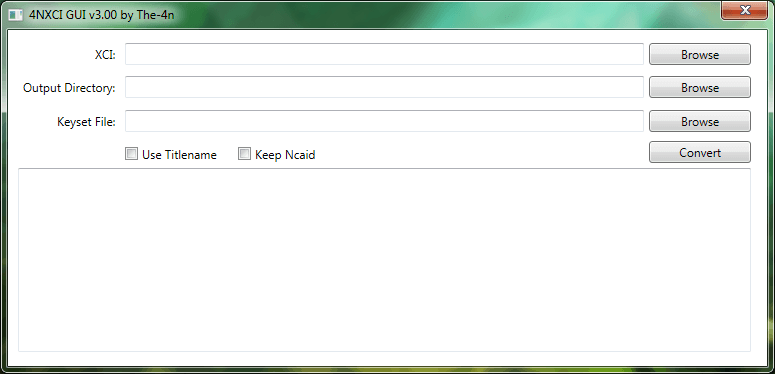
Konvertiert Spiele von XCI in NSP.

Die neue Key-Generierung für die Firmware 6.2.0+ wird nun unterstützt, auch lassen sich GameCards mit mehreren Updates umwandeln und Optionen zum Ändern des temporären Verzeichnisses und des Ausgabeordners wurden hinzugefügt.

* Added support for keygeneration 7
* Added options for setting temp and output directory paths
* Added support for gamecards with multiple updates

XCI Explorer v1.4.4

Nintendo Switch, Nintendo Switch: Update ,

XCI Explorer

Zeigt verschiedene Infos zu XCIs und NSPs an und kann Zertifikate extrahieren und importieren. Der NxFileViewer ist eine bessere Alternative.

Der master_key_05 für 6.0.0 und 6.1.0 wird jetzt unterstützt (im Changelog steht fälschlicherweise MasterKey4); auch wurde hactool auf den aktuellen Stand gebracht.

* MasterKey4 support
* Latest hactool
* Minor bug fixes

hactool v1.2.2

Nintendo Switch, Nintendo Switch: Update ,

hactool

Mit diesem Kommandozeilentool können verschiedene Formate für die Switch angesehen, entschlüsselt und extrahiert werden.

hactool unterstützt jetzt die 6.2.0-Crypto und den zugehörigen Master-Key.

-Support was added for 6.2.0+ new key derivation using tsec_root_key and master_kek_source_##.
-6.2.0 keydata will no longer be called "Unknown".
-A bug was fixed involving argument violation to mbed_tls aes routines.

4NXCI v1.36

Nintendo Switch, Nintendo Switch: Update ,

4NXCI

Konvertiert Spiele von XCI in NSP.

Die Patching-Methode für die CNMT (die Datei, die die Metadaten enthält, ähnlich der TMD für andere Nintendo-Konsolen) wurde abgeändert und ein Fehler wurde behoben, der dazu führte, dass der falsche Wert für die erforderliche Firmware eingetragen wurde. Auch löscht 4NXCI den temporären Ordner nach der Konvertierung.

* 4NXCI now delete temp folder after the conversion is finished
* Changed cnmt patching method
* Fixed a bug cause invalid RequiredSystemVersion value in patch cnmt.xml

splitNSP v1.0.1 – große NSPs für FAT32 splitten

Nintendo Switch, Nintendo Switch: Neu , ,

splitNSP

Python-Skript zum Splitten von NSP-Dateien in 4 GB Parts für FAT32.

AnalogMan hat ein PowerShell-Skript aus dem Nintendo Switch SDK in Python neu geschrieben, welches NSPs mit einer Größe von mehr als 4 GB splitten kann, damit sie mit einer FAT32-formatierten SD-Karte installiert werden können.

Von der Nutzung von exFAT wird nämlich strengstens abgeraten, da es keine Backup-Tabelle besitzt und in Verbindung mit Homebrew garantiert zu Datenverlust führt. Das liegt auch an Nintendos schlechtem Treiber für das Dateiformat. Deshalb wird jedem strengstens empfohlen, FAT32 zu nutzen. Ein großes Problem ist allerdings, dass FAT32 Dateien mit größer als 4 Gigabyte nicht unterstützt – normalerweise kein Problem, da sich XCIs bspw. splitten lassen. Jetzt ist das Ganze auch mit NSPs möglich!

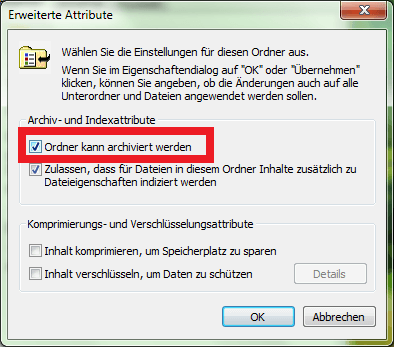
Dazu einfach Python installieren, die NSP auf das Skript ziehen, dem Ordner das Archiv-Bit verpassen und auf die SD-Karte verschieben! Schon lässt sich die NSP installieren, ohne sie erst übers Netzwerk schicken zu müssen.

Boop v2.0.0 – NSPs übers Netzwerk an Tinfoil senden

3DS, 3DS: Update, Nintendo Switch, Nintendo Switch: Neu , , , ,

Boop

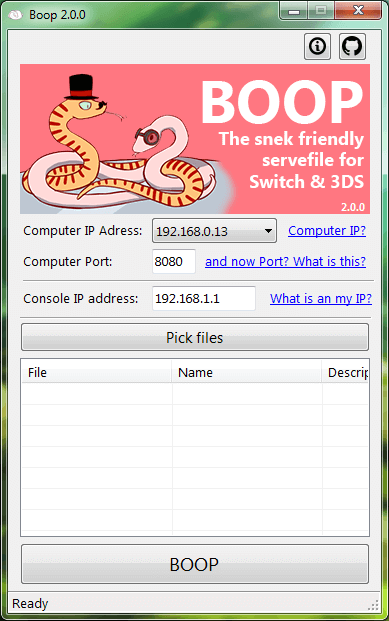
Mit Boop können CIAs und TIKs kinderleicht an FBI (3DS) und NSPs an Tinfoil (Switch) gesendet werden. Nur für Windows.

Da Tinfoil die gleiche Implementation für Installationen übers Netzwerk wie FBI benutzt, wird der NSP-Installer jetzt ebenfalls unterstützt und es können NSPs bequem über den PC an die Switch gesendet und installiert werden! Unübliche Zeichen in Dateinamen (wie Emojis) funktionieren auch und ein verbesserter HTTP 2.0 Server wurde implementiert.

* Added support for Tinfoil on Nintendo Switch (Thanks to @Adubbz for his patience)
* New and improved http 2.0 server implementation (EmbedIO)
* Full support for crazy characters in the names. (Including emojis!)
* A bit of UI redesigning and cosmetics.
* ANOTHER SNEK!!! AND THIS HAS A TOP HAT!!!

dOPUS v0.6 – NSP- und XCI-Installer

Nintendo Switch, Nintendo Switch: Neu , ,

Hidki hat den NSP- und XCI-Installer "dOPUS" für die Switch veröffentlicht. Er kommt mit einer hübschen, grafischen Oberfläche in Form eines Dateibrowsers daher und installiert auch extrahierte NSPs und XCIs (NCA-Dateien). Der Installer basiert dabei auf 4NXCI und Tinfoil.

Features:

  • Dateibrowser
  • Installiert NSP und XCI, auch extrahiert (NCA)
    • Für XCI muss sich eine keys.dat im Root der SD befinden
  • Extrahiert NSP und XCI
  • Konvertiert XCI in NSP
  • Kann die Dateien auch direkt nach der Installation löschen