Zum Inhalt springen
Menü

Theme ändern
Unterstütze uns
PayPal-Logo Patreon-Logo
Abonniere uns per RSS Folge uns auf X (ehem. Twitter) Like uns auf Facebook Trete dem WiiDatabase-Kanal auf Telegram bei und erhalte alle News sofort!

Wir hosten zurzeit 648 Homebrews mit über 4.294.016 Downloads!

Nützliche Links
Kategorien
Archiv
Über uns

Pokémon Rubin und Saphir bekommen Remakes

3DS, DS/DSi/3DS , , , ,

pokemon_rubin_saphir_remake

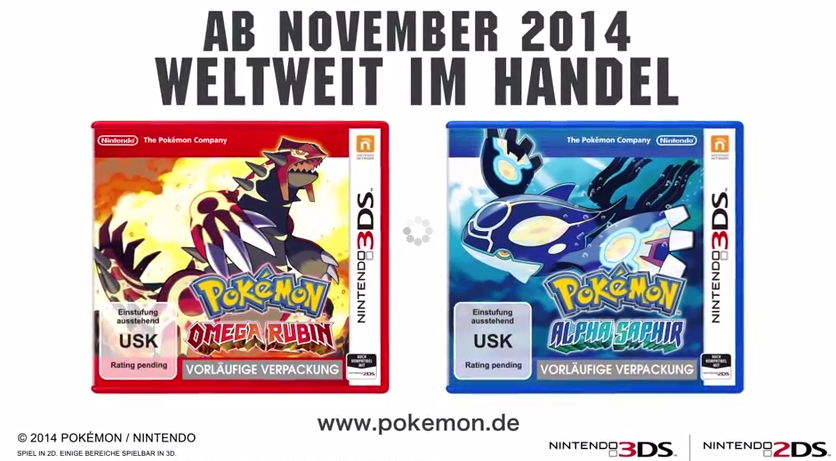
Wie aus dem Nichts kündigte Junichi Masuda von Game Freak heute Remakes zu den 2003 erschienenen Pokémon-Edition "Rubin" und "Saphir" an.

Im November dieses Jahres sollen die Editionen "Pokémon Omega Rubin" und "Pokémon Alpha Saphir" für den Nintendo 3DS erscheinen. Die Spiele werden hauptsächlich in 2D sein, aber es gibt einige Passagen, die einen 3D-Effekt bieten. Der rund 31 Sekunden lange Ankündigungstrailer sagt aber noch nicht viel über die Spiele aus.

via

Nintendont v1.29

vWii, Wii, Wii: Update , , , ,

nintendontNintendont wurde aktualisiert!

Download

Es gibt eine spektakuläre Neuerung: Caching! Damit sollten Spiele jetzt viel schneller laden! Um dies zu nutzen, bedarf es allerdings etwas Arbeit. Es muss eine cache.txt mit Dateinamen (maximal 220) erstellt werden, die das Spiel lädt. Bspw. kann man mit Dolphin nachsehen, welche Dateien geladen werden. Mit der Zeit werden bestimmt auch Cache-Lists für Spiele auftauchen! Crediar hat ein Beispiel für Super Smash Bros. Melee hochgeladen. Dieses muss als "cache.txt" in das gleiche Verzeichnis wie die game.iso gespeichert werden. Wenn einige Spiele gar keine Schrift anzeigen (wie F-Zero) wird eine font_ansi.bin benötigt. Diese ist im Downloadpaket bei uns bereits enthalten! Alternativ könnt ihr diese von Dolphin laden! Crediar hatte diese Woche schon ein Video zum Caching gezeigt.

Zudem wurde noch einiges an Code optimiert. Neue Controller-Patches wurden hinzugefügt, die mehr Spiele unterstützen sollen, diese sind aber noch nicht voll getestet worden.

v1.29
-Fixed a few warnings
-Can now be compiled with AUDIOSTREAM defined

v1.28
-used wrong devkit for r27, sorry

v1.27
-added a new controller patching method which seems to be required for some games to be controllable, its still not fully tested so I cant promise every game is controllable now

v1.26
Try to use font_ansi.bin if no ipl.bin file is found.

v1.25
*Added file caching
*Updated EXIDMA and EXIImm to prevent register corruption
*Updated DCInvalidateRange to handle smaller than 32 bytes reads (Triforce)
*Removed __OSReadROM patch
*Removed unused patches
*Optimised some code
*IPL reads are now done to MEM2 first and then copied to dst to prevent data corruption

Note: Certain games try to load the IPL font and crash or don't display any font at all when the sd:/ipl.bin or usb:/ipl.bin is missing! (i.e. FZero-GX)

File caching:
Put a file called cache.txt into the same dir as the game.iso and put any filenames you want to cache in there.
There is currently a file limit of 220 entries.

USB Loader GX r1226/1227

vWii, Wii, Wii: Update , ,

Erneut wurde der USB Loader GX aktualisiert!

Download

HINWEIS: Bevor hier gleich wieder die ersten angerannt kommen "DA STEHT ABER r1226!!" lasst euch sagen: r1226 und r1227 sind IDENTISCH! Die r1227 ist nur ein Hinweis für den Updater und den Installer, dass es jetzt eine neue Version gibt!

In der r1225 wurde das Downlaoden von Cheats von GeckoCodes.org gefixt (endlich!) und es wird auch jetzt geprüft, ob diese korrekt gedownloadet wurden. Die Option "Error 002" ist jetzt immer auf "Anti" gesetzt und wurde deshalb entfernt. Der Error 002 wird somit automatisch gefixt (trat früher häufig im Zusammenhang mit Modchips auf, heute fast gar nicht mehr).

r1226
* Forgot two changes in r1225. Not enough tests is bad...

r1225
* Fixed Ocarina download from Geckocodes  issue2253  (Thanks Gave92)
* Added a check for downloaded Ocarina content (Thanks Airline38)
* Removed Error #002 setting (Always set to Anti)

USB Loader GX v3.0 r1224

vWii, Wii, Wii: Update , ,

Der USB Loader GX wurde aktualisiert!

Download

Die Gamecube-Video-Einstellungen wurden zu einer Option zusammengeführt. Wer "Benutze Spieleinstellungen" eingestellt hatte, muss dies manuell umstellen. Ein Problem wurde behoben, in dem der USB Loader GX Dateien auf der SD erstellt hat, obwohl die boot.dol auf einem USB-Medium war. Die meta.xml wird nun automatisch an die User-Einstellungen angepasst. Außerdem wurde Support für Nintendont ab v1.20 hinzugefügt und Gamecube-Spiele im FST-Format (die, die mit DiscEX erstellt wurden) funktionieren nun auch.

r1224
* Merged Gamecube Video settings to a single option.
  If you used the option "Use game settings" you will have to
  fix your settings manually. Sorry, for the inconvenience.

r1223
* Fixed an issue where setting files were created on SD
  if boot.dol was on USB (Thanks Badablek)
* Added Auto-edition of meta.xml arguments based on internal
  user settings.
* Added support for meta.xml arguments when rebooting the loader.

Nintendont :
* Added support for v1.20+
* Fixed launching Gamecube in FST format with nintendont
  (Thank VashTS)

Nintendont v1.23

vWii, Wii, Wii: Update , , ,

nintendontNintendont wurde aktualisiert!

Download

In Version 1.22 und 1.23 wurde Support für "UStealth" hinzugefügt, welches erlaubt, die Festplatte vor der Wii U zu "verstecken", sodass diese nicht mehr formatiert werden möchte (der PC selbst erkennt dann die Festplatte nur mit dem UStealth-Programm).

v1.23
Actually implement the change meant for r22 (Fix UStealth).

v1.22
Fix UStealth. - Thanks airline38

Dolphin Progress Report: März und April 2014

Wii , , , , , ,

dolphin-progress-report

Die Entwicklung von Dolphin, dem Wii & Gamecube Emulator, geht sehr schnell und ist sehr unübersichtlich für alle, die sich nicht genug damit beschäftigen. Es gibt große Änderungen, wie dem tev_fixes_new Merge, über den das Dolphin-Team erst kürzlich berichtet hatte, doch auch viele kleine Änderungen machen Dolphin perfekt(er). Der Dolphin Progress Report soll diese Änderungen monatlich besser beleuchten.
Eine deutsche Zusammenfassung des WiiDatabase Teams.

Weiterlesen "Dolphin Progress Report: März und April 2014"

Promo-Aktion: Mario Kart 8 kaufen und eins von zehn Wii U Spielen gratis bekommen

Allgemein , , , ,

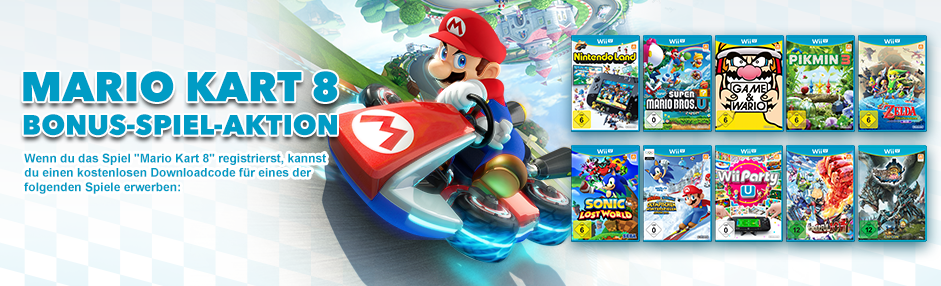
mk8promoNintendo hat auf Facebook den Start einer Promoaktion zu Mario Kart 8 bekanntgegeben – und die kann sich sehen lassen!

Am 30. Mai erscheint Mario Kart 8 und wenn du es bis Ende Juli kaufst und im Club Nintendo registrierst, kannst du dir eines der folgenden Spiele raussuchen (als Downloadcode):

  • Nintendo Land
  • New Super Mario Bros. U
  • Game & Wario
  • Pikmin 3
  • The Legend of Zelda: The Wind Waker HD
  • Sonic Lost World
  • Mario & Sonic bei den olympischen Winterspielen: Sotschi 2014
  • Wii Party U
  • The Wonderful 101
  • Monster Hunter 3 Ultimate

Die Teilnahmebedingungen findest du auf der Nintendo-Website.

Witgui v2.1.3

vWii, Wii, Wii: Update , , , , ,

Witgui, der Wii  & Gamecube Spiele-Manager für OS X wurde aktualisiert! Es werden FAT und WBFS unterstützt. Alternativ kannst du noch NTFS-3G nachinstallieren, um auf NTFS-Platten zuzugreifen!

Download

Wii-Spiele werden im Finder nun auch als solche angezeigt. Die Konvertierung nach .wia ist nun auch möglich. Beim Übertragen der Spiele können überflüssige Partitionen des Spiels gelöscht werden (z.B. die UPDATE-Partition). WBFS-Partitionen können nun überprüft und repariert werden, Spiele können auch gecheckt werden. Außerdem werden jetzt nur noch OS X Versionen ab Lion (10.7) unterstützt! Es wurden dann noch weitere Bugs gefixt.

Changelog

v2.1.3
The size of the icons in the Icon view can be customized, the dialog for transfers to WBFS partitions can be hidden, /disk can be used instead of /rdisk to access WBFS partitions, flat covers can be used instead of 3D covers (in the Preferences panel).

FIXED BUGS
Games can be dragged from the Icon view to the Finder. Games on WBFS partitions can be correctly verified.

v2.1.2
Corrected the QuickLook plugin bug that caused some files to get the wrong game cover as a thumbnail (to reset the thumbnail of the files inside the directory “myDirectory”, run “rm myDirectory/._*” in a Terminal window). The table columns are sortable again.

v2.1.1
Thumbnails are now correctly set by the QuickLook plugin.

v2.1
New QuickLook plugin to preview and display thumbnails in the Finder of .wbfs, .wia, .wdf, .ciso and .iso files (the last ones have to be set to be opened with Witgui, otherwise the standard thumbnail/preview will be used). New icon display mode along the already known list mode. Conversion to .wia is now supported. Added option to keep only the DATA and CHANNEL partitions when transferring a game (this can save some space). wit and wwt are searched in the order in the following directories: first in /usr/local/bin, then in the custom path, if any (can be set by selecting “File > Locate wit/wwt” while pressing the OPT/ALT key) and finally in the Application Support folder (where they are downloaded after selecting “File > Download wit/wwt”. The “Terminal tricks” for gaining access to WBFS partitions can now automatically be done after downloading wwt. Added menu items to check/repair WBFS partitions and verify games.

FIXED BUGS
WBFS partitions are now correctly detected. Fixed bug that caused unnecessary directories to be created when renaming/converting a game and a game detail contained a “/”. Fixed a bug where a conversion’s progress bar stopped just before reaching the end.

UPDATES
WBFS partitions can be safely ejected from the File menu.

USB Loader GX Theme Creator v1.05

vWii, Wii, Wii: Update , ,

Der USB Loader GX Theme Creator wurde aktualisiert.

Download

Dieses Update ist vom 01. März 2014, also noch nicht so alt 😉

Dies ist hauptsächlich ein Bugfix-Release. Der Theme Creator vorher nicht richtig sprechen Deutsch können, da Sprache anders basierend war. Er nun sprechen besser deutsch, da Sprachdateien basieren auf Englisch!

Fix bugs concerning:
- banner icon frame edge tev color 2
- banner icon frame edge tev color 3
- category switch prompt align hor
- category switch prompt align ver
- category switch prompt pos x
- category switch prompt pos y
Changing the editing panel.
The language files are now based on English.

Wii Backup Manager v0.4.6 build 79

vWii, Wii, Wii: Update , , ,

Ich hab doch gesagt, es gibt alte Updates!

Der Wii Backup Manager wurde schon seit ewigen Zeiten nicht mehr aktualisiert. Ein User auf GBATemp hat aber eine neue Version hochgeladen, die er von fig2k4 bekommen hat.

Download

Mit dem Wii Backup Manager kannst du deine Wii-Spiele verwalten. Er kann Spiele von WBFS, NTFS und FAT32 lesen und Wii-Spiele umwandeln.

Die Cover werden nun schöner gerendert. Mehrere Instanzen des Wii Backup Managers im gleichen Ordner sind nun nicht mehr möglich, da sich dieser sonst aufhängen würde. Wenn man einen Ordner auswählt, gibt es nun einen neuen Dialog, der einem erlaubt, manuell einen Pfad einzugeben (man kann aber immer noch "Durchsuchen" anklicken!).

0.4.6 Build 79
--------------
|-Added: A little antialiasing for the software cover renderer.  Still not as good as using OpenGL/Direct3D, but it removes some of the jaggies when the image isn't too large.
|-Changed: The covers menu moved to "Tools->Covers".
|-Changed: Internal cover folder format to "c:\covers\3d". I'm not sure why it was using "c:\covers\3d\%s.png".
|-Added: When selecting a folder, there's a new dialog that allows you to manually enter the path. Use the button in the dialog to browse for the folder just as before. 
|-Changed: Only one instance of WBM is allowed to run from the same folder at any time. It's still possible to run multiple instances as long as they're not in the same folder. The main reason for this is that the database can't be shared between instances and would lock up the app.


Sharpii v1.7.2

Wii, Wii: Update ,

Ähhh ja… Beim Durchgehen unserer Datenbank hab ich Screenshots zu den PC-Programmen hinzugefügt und auch überprüft, ob alles aktuell ist. Das war es offensichtlich nicht, deswegen schreiben wir die News jetzt nach! Dass die meisten Updates ein Jahr alt sind, verschweigen wir einfach mal… 😛

Download

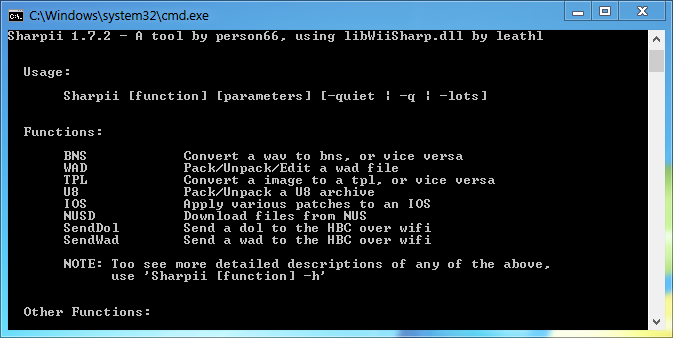
Sharpii ist ein Kommandozeilentool mit dem man verschiedenen Dateien patchen und (ent-)packen kann. Ein Bild sagt mehr als 1000 Worte:

sharpii

Sharpii wurde am 15. Februar 2013 auf v1.7.2 aktualisiert, in unserer Datenbank war noch die v1.4!

Es hat sich viel getan! Mittels SendWAD können nun WADs an den Homebrewkanal geschickt werden. Sharpii kann nun auch IOS downloaden (mit –ios NUMMER VOM NUSD). Es wird nun auch auf fehlende .DLLs geprüft, die Sharpii dann nachlaen kann. Die IP kann nun in einer Variable gespeichert werden (siehe Changelog) und das Programm kann jezt auch ohne .exe genutzt werden, indem man es installiert. Außerdem gab es viele Bugfixes.

Changelog

v1.7.2
- Fixed a bug that would prevent you from changing a wad type
- Wad info now also displays the full, 16-character Title ID

v1.7.1
- Fixed a bug that prevented Sharpii from checking for SharpiiIP in the system variables

v1.7
- Sharpii can now be installed for use without the exe
- SharpiiIP is now a system variable, not a user one.
- Sharpii now looks for DLLs in the same directory as the exe
- Bug fixes

v1.6
- SendWad now supports AHBPROT (use '-ahb')
- IP can now be saved in an environmental variable (SharpiiIP) for both SendWad and SendDol (manually or with '-saveip')
- Pointless aster eggs are fun!
- Code cleanup/bug fixes

v1.5
- Added the ability to send WADs to the HBC using SendWad
- You can now download an IOS with -ios # in NUSD
- Downloaded IOS wads are now named like so: IOS##-64-####.wad
- Under certain conditions, when downloading a wad with NUS, it will not be saved in a folder, just as the WAD (see ReadMe)
- If missing dll's are detected (WadInstaller or libWiiSharp), Sharpii will ask to download them, if they are required.
- You can now use a .dol file instead of a .wad with the '-dol' in the WAD editor/packer
- Probably a few other little things I have forgotten
- Even more code cleanup and bug fixes

postLoader v4.7.4

vWii, Wii, Wii: Update , , , , ,

stfour hat nach einiger Zeit wieder den postLoader aktualisiert.

Download

Der postLoader ist ein Systemmenü-Ersatz mit vielen Extras. Er kann wahlweise automatisch mit dem PriiLoader gestartet werden. Er kann sogar als USB-Loader fungieren und NEEK starten!

Neu ist ein verändertes Plugin-System, womit man nun verschiedene Emulatoren für ein Spiel nutzen kann. Sonst gab es nur Bugfixes und Perfomanceverbesserungen.

Changelog

postLoader 4.7.4

* Fix files without extension detected as rom
* updated plugins.conf with latest corrections. 
* Starting from now, plugins.conf has a version number (v.1)

postLoader 4.7.3

* fix roms/folders dupes

postLoader 4.7.2

* fixed category issue in wii/gamecube games
* updated download site to http://postloader.dnsdynamic.net, the new official site for downloads

postLoader 4.7.1

* remove useless file thread locking system.
* increased thread priority for covercache. This will solve sound stuttering and very slow file writing during creation of cover cache files (if enabled)
* now postloader select exact cover name for covers
* postloader require customfat (and customntfs) to be compiled (from wiiflow). Some file where missing during games/roms browsing with standard library.

postLoader 4.7.0

* new plugin managment system. Now roms are organized on per-system basis. When you select a rom, you can choose your preferred emulator. The plugin.cfg file has a new sintax.

postLoader 4.6.2

* updated grlib library (added transparency option for icon/panel borders)
* ChannelBrowser: updated find_title_name function. Thx kuwanger!!!
* little ui changes

Configurable USB-Loader Mod r71

vWii, Wii, Wii: Update , , , , ,

Auch die Kleinen brauchen Beachtung: Er war der erste USB-Loader, der NTFS eingeführt hat. Er war der erste USB-Loader, der DIOS MIOS implementiert hat. Er war auch einer der ersten, der Devolution konnte! Und nun? Jetzt fristet er ein Nischendasein zwischen den großen Größen der USB-Loader-Homebrew-Welt: dem USB Loader GX und dem WiiFlow. Seit 2012 wird der CFG-Loader nicht mehr weiterentwickelt. FIX94 und R2-D2199 entwickelten dann eine Modifikation des CFG-Loaders, die dann meist schneller aktualisiert wurde, als wir mit dem Schreiben hinterhergekommen sind! Wir haben die r71 kompiliert, die vom 20. April 2014 stammt.

Seit der Revision 65 hat sich schon etwas getan, jedoch leider zu wenig für ein großes Comeback. Es gibt z.B. noch keinen Nintendont-Support. Der CFG-Loader braucht mehr Aufmerksamkeit, da er wirklich ein 1A USB-Loader ist, der sich von vorne bis hinten bedienen anpassen lässt. Für die Verbreitung sind wir ja zuständig 😉

Download

Der CFG implementiert wieder was, von dem wir glauben, dass es auch in anderen USB-Loadern nützlich sein könnte: eine Suchfunktion für Spiele! Somit kann man seine "legal kopierten Spiele" durchsuchen! Dieses Feature ist aber noch experimentell. Zusätzliche Filter runden die Suchfunktion dann noch ab (bspw. alle Spiele, die das Nunchuck unterstützen, etc.). Größtenteils wurden Bugs ausgemerzt und die Sprachen erneuert, die jetzt auch beim Updaten mit heruntergeladen werden können. Direktes Mapping der Knöpfe für Devolution ist nun auch drinnen.

Changelog

r71
Kein Changelog vorhanden

r70
-Added a check so if someone is working on a translation and does an online
update it dosent overwrite their work in process
-Added FI.lang (Thanks MysTiCy)
-Updated ZH_CN.lang (Thanks Kavid) IT.lang (Thanks Cambo) ES.lang (Thanks
TyRaNtM) GR.lang (Thanks xxdimixx) DK.lang (Thanks Fox888) NL.lang (Thanks
wiiuser2)
-Fixed several more spots ware translation wasnt working

r69
-Added additional controllers to filter by controller
-Added downloading language files when updating to a new version
-Fixed downloading covers for regions that are undefined in the gametdb data
base mostly used by customs
-Fixed gametdb lookups when an id6 has an id4 in the id that matched the first 4
characters
-Updated FR.lang (Thanks JABE)
-Automatically load unifont if JA, KO and ZH language or db files are used
-Fixed several spots ware translation was not working
-Updated Search function (still a work in process)

r68
-Added separate themes for each profile
-Added profile_start_favorites [0,1]... option to config.txt [0,1] repeats for
each profile
-Fixed memory leak when reloading game list (caused sort problem when unlocking
admin mode)
-Updated lang.pot , FR.lang (Thanks JABE), JA.lang (Thanks Trickart), ZH_CN.lang
(Thanks Kavid)
-Updated Search function (still a work in process)

r67
-Updated Search function (still a work in process)
-Spead up filters, switching on favorites, hiding games
-Fixed WiFi Players not displaying when WiFi Players = 1
-Fixed Sort not working when selecting filter, then sort, then a different
filter
-Increased the max synopsis length used
-Fixed sorting by install date for channels, gamecube if on fat,
-Fixed drive corruption when using Devolution with nmm and the isos on a
different drive than cfg
-Added Devolution LED control
-Fixed Devolution when isos are on sd:
-Added Devolution direct button mapping support

r66
-Added Search function (still a work in process)
-Added display of DOIS MIOS version 2.10+ if installed
-Fixed launching neek2o plugin
-Fixed mighty plugin ocarina support