Zum Inhalt springen
Menü

Theme ändern
Unterstütze uns
PayPal-Logo Patreon-Logo
Abonniere uns per RSS Folge uns auf X (ehem. Twitter) Like uns auf Facebook Trete dem WiiDatabase-Kanal auf Telegram bei und erhalte alle News sofort!

Wir hosten zurzeit 648 Homebrews mit über 4.267.352 Downloads!

Nützliche Links
Kategorien
Archiv
Über uns

Schlagwort: emulator

ZX Spectrum Emu v0.1 für 3DS

3DS, 3DS: Neu , ,

Seagal hat den ersten ZX Spectrum Emulator für den 3DS veröffentlicht!

Download

Bis zu 1300 .sna ROMs können in den SNA-Ordner abgelegt werden. Momentan hat dieser aber noch keinen Sound und es soll keinen Support für weitere ROM-Formate geben.

Steuerung

Taste Aktion
Hoch Q
Runter A
Links O
Rechts P
Y Leertaste
B M
X Shift rechts
A Joystick Fire
Start ENTER
Touch-Keyboard Alle anderen Tasten
L/R im Auswahlmenü Vorherige/Nächste Seite
L+R+Start Emulator Beenden

Visual Boy Advance GX v2.3.2 Mod

vWii, Wii, Wii: Update , , , ,

Die Modifikation des Visual Boy Advance GX von libertyernie wurde aktualisiert.

Download

Es wurde Support für 240p (NSTC und europäisches RGB) und den Wii U Pro Controller hinzugefügt. Eigene Rahmen können jetzt von PNG-Dateien geladen werden, dies muss in den Emulator-Einstellungen aktiviert werden. Allerdings müssen die Pixel im Rahmen die gleiche Größe wie die Pixel im Spiel besitzen – dies wären dann 320×240 Pixel.

- 240p support added (NTSC and European RGB)
- Wii U Pro Controller support
- Borders of arbitrary size supported - loaded from PNG files (must be enabled in Emulation settings)
    - Known issue: pixels in the border must be the same size as pixels in the game - unless you want a tiny screen you're effectively limited to about 320x240.

TronDS v1.0.0.5

3DS: Update , ,

TronDSjocopoco hat v1.0.0.5 des 3DS-Homebrew-Emulators "TronDS" released.

Download

Es wurde die Emulation des Circle Pads hinzugefügt, die Soc:U und Cfg:U Services werden unterstützt, genau wie ARM Media Instructions. Außerdem wurden Fehler in der VFPU- und GSP:GPU-Emulation und andere kleine Dinge gefixt.

TronDS-screen1

- Added Circle Pad emulation
- Added support for Soc:U and Cfg:U services
- Added support for ARM Media instructions
- Fixed bugs in VFPU emulation
- Fixed bugs in GSP:GPU emulation
and other small changes and fixes

Not64 v20150121

vWii, Wii, Wii: Update ,

2 Jahre ist es jetzt her, dass Extrems eine Modifikation von Wii64 veröffentlicht hat, nun hat er diese aktualisiert.

Download

Es wurden neue Optionen hinzugefügt, darunter eine für den Video-Modus, einen TrapFilter (für ältere CRT TVs), Optionen für Samba-Shares und ob eine ROM beim Start geladen werden soll.

Ja, richtig gelesen: Not64 kann jetzt Spiele hochskalieren!

not64secedition

New options:

ScalePitch
- Changes pitch according to emulation speed.
VideoMode
- 0: Auto - 1: 480i60 - 2: 240p60 - 3: 480p60 - 4: 576i50 - 5: 288p50 - 6: 576p50
TrapFilter
- Affects composite video, similar to the GameCube's output.
- Recommended for lower-end CRT TVs.
smbusername, smbpassword, smbsharename, smbipaddr
rompath
- Automatically load a ROM file on startup.

UAE Wii v12

vWii, Wii, Wii: Update , ,

Oibaf hat UAE Wii aktualisiert.

Download

Ein Hintergrundbild und Sound wurde in das Menü eingefügt, dort kann jetzt auch horizontal gescroltl werden. Die Schriftart ist nun lesbarer und "Autofire" wurde hinzugefügt (kann von der virtuellen Tastatur aus eingestellt werden). Eine Option für VSync wurde hinzugefügt und die Rumble-Funktion ist nun im Wiimote-Menü zu finden. Ansonsten gab es nur Bugfixes, näheres im Changelog.

- Added background image in the GUI
- Added sound in the GUI
- Horizontally scrolling menu
- More readable fonts in the GUI
- Added autofire (configurable from virtual Keyboard)
- Added vsync option
- Moved Rumble option in wiimote menu
- Changed the refresh rate option
- Shorter bootstrap
- Fixed file attributes in virtual filesystem emulation
- Other bug fixes

blargSnes v1.3 – SNES-Emulator für den 3DS

3DS, Wii: Update ,

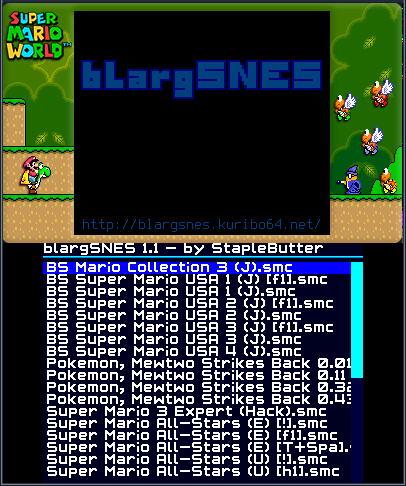
StapleButter hat seinen ersten SNES-Emulator für den 3DS aktualisiert.

Download

Die Geschwindigkeit wurde durch Geometrie-Shader verbessert und der Hardware-Renderer hat einige Fixes verpasst bekommen. Die Soundqualität sollte nun viel besser sein und es gibt zwei Skaliermodi: 4:3 und abgeschnittenes 4:3. ROMs können nun aus jedem Verzeichnis ausgewählt werden und zu guter Letzt wurde die Open-Bus-Emulation verbessert.

* Usage of geometry shaders and other speedups to rendering
* Hardware renderer: offset-per-tile, hi-res modes, and more fixes by DiscostewSM
* Much better sound quality, support for noise, echo and pitch modulation (thanks DiscostewSM again)
* Two added scaling modes: 4:3 and cropped 4:3
* Better open-bus emulation, and ability to execute code in open-bus regions (fixes Home Alone)
* Overall more accurate timings, IRQ fixes, etc
* ROM selector is no longer locked to the /snes folder
* the usual forgotten novelties, surprise

Visual Boy Advance GX v2.3.1 Mod

vWii, Wii, Wii: Update , ,

libertyernie hat seine Modifikation des Visual Boy Advance GX aktualisiert.

Download

Super Game Boy Ränder werden nun unterstützt und können geladen werden. Eigene Paletten können nun auch wieder angewandt werden und die Gameboy-Hardware (GB/GBC/SGB/auto) kann selbst ausgewählt werden. Es wurde ein "Fixed Pixel Ration" Modus hinzugefügt und die Real-Time-Clock für Pokémon Silber/Gold/Kristall wurde gefixt. Außerdem kann jetzt zwischen "scharfem" und "softem" Bild gewechselt werden.

vbagx-border

Changelog

Changes in 2.3.1:

  • Super Game Boy border support
    • Borders can be loaded from (and are automatically saved to) PNG files
    • Any border loaded from the game itself will override the custom PNG border
  • Custom palette support from 2.2.8 restored
  • Option added to select Game Boy hardware (GB/SGB/GBC/auto)
  • Fixed pixel ratio mode added
    • Overrides zoom and aspect ratio settings
    • To squish the picture so it appears correctly on a 16:9 TV, you can open
      the settings.xml file and add 10 to the gbFixed/gbaFixed value. However,
      setting your TV to 4:3 mode will yield a better picture.
  • Real-time clock fixes for GB/GBC games, including Pokémon G/S/C
    • RTC data in save file stored as little-endian
    • Option added for UTC offset in the main menu (only required if you use the
      same SRAM on other, time-zone-aware platforms)
  • New option for selecting "sharp" or "soft" filtering settings
    • "Sharp" was the default for 480p, "soft" was the default for 480i

FBZX Wii v13

vWii, Wii, Wii: Update , , ,

Oibaf hat den Sinclair ZX Spectrum Emulator "FBZX Wii" auf v13 aktualisiert.

Download

Es gibt jetzt ein neues, kürzeres Set der Microspeech Allophones, die Lautstärke kann nun in den Einstellungen verändert werden, ebenso die Lautstärke des Currah Microspeech Units. Außerdem ist "2" nun die standardmäßige Feuern-Taste.

- New set of microspeech allophones (shorter)
- Added GUI volume setting
- Added Currah microspeech volume setting
- SE Basic extended to all models
- Wiimote button 2 as default fire

3DSGBA – Erster GBA-Emulator für den 3DS veröffentlicht

3DS, 3DS: Neu , , ,

3DSGBASteveice10 hat den ersten Gameboy Advance Emulator für den 3DS veröffentlicht!
Download

Er läuft momentan sehr langsam und hat keinen Sound.

Steuerung:
Datei auswählen:

  • A – Datei/Verzeichnis auswählen
  • B – Ein Verzeichnis zurückgehen
  • START + SELECT – Emulator beenden
  • TOUCH – Emulation fortsetzen, wenn ein Spiel pausiert ist

In-Game:

  • Normale GBA-Knöpfe steuern das Spiel
  • X – Ein Savestate anlegen
  • Y – Ein Savestate laden
  • TOUCH – Öffnet das Datei-Menü und pausiert das Spiel

blargSnes v1.2

3DS, Wii: Update ,

Der SNES-Emulator für den 3DS "blargSnes" wurde auf Version 1.2 aktualisiert.

Download

Es gibt jetzt einen brandneuen Renderer, der die Hardware nutzt. Support für das Skalieren wurde hinzugefügt, es gibt einen "Beenden" Button (für den Homebrew Launcher gedacht), weitere Emulations-Fixes, Support für de 256×239-Modus, richtigen PAL-Support (nutzt jetzt PAL-Timing), Versuche, die GPU nicht einzufrieren, Synchronous SPC700 Support und weitere Bugfixes und Perfomance-Verbesserungen.

Version 1.2:
* Brand new hardware-accelerated renderer
* Scaling support
* Exit button (mainly for use with the Homebrew Launcher)
* Emulation fixes (namely, huge 'next EXP' in Earthbound is fixed)
* Support for the 256x239 mode
* Proper PAL support (actually uses PAL timings)
* Tries to prevent GPU freezes
* Synchronous SPC700 (fixes issues but also causes a little slowdown)
* As usual, more crap I forgot about. Hah.

UAE Wii v11

vWii, Wii, Wii: Update , ,

Der Amiga-Emulator UAE Wii wurde auf v11 aktualisiert (via).

Download

Die Kompatibilität und die Emulations-Geschwindigkeit wurden erhöht. Hardfile und Virtual File System Support wurde hinzugefügt und die Amiga-Farben werden nun für die GUI benutzt, die Fenster haben nun Ränder. Die Sound-Frequenz beträgt nun 48k und einige kleine Bugs wurden gefixt.

- Update to E-UAE 0.8.29 (more compatibility)
- Added 320X240 resolution (more emulation speed)
- Added hardfile and Virtual File System support in the GUI
- Amiga colors for GUI, added borders to the windows
- Set sound frequency to 48k
- Small bug fixes

TronDS v1.0.0.3

3DS, 3DS: Neu, 3DS: Update , ,

TronDSTronDS wurde aktualisiert. TronDS ist – trotz des Namens – ein 3DS-Homebrew-Emulator. Er emuliert also nur 3DS-Homebrews, keine kommerziellen Spiele! Aber gut für Entwickler.

Download

TronDS-screen1

Changelog

v1.0.0.3
- Added support for 3d rendering.
- Added support fo FS service.
- Added support for GPU service.
- Added support for kernel syncro objects like mutexes,semaphores et etc.
- Fixed a bug in linear memory allocation.
- Fixed a bug in rescheduling threads.
and other small changed and fixed.

v1.0.0.2
New version of TronDS a Nintendo 3DS Emulator, 1.0.0.2, more changes, like
- Added support for 3DS files
- Added support for VFPU
- Added support for Breakpoints
- Fixed some bug in ARMv6 opcodes

v1.0.0.1
First version of TronDS a Nintendo 3DS Emulator, It's very simple and is only capable of running homebrews. It currently supports:
- ARM9/ARM11 interpreter for the 3DS appcore – the processor core dedicated to running user applications
- OS HLE to support userland interaction with the various 3DS OS services
- Framebuffer rendering
- Debugger with ARM11 disassembler, register view (written in C#)

blargSnes v1.1

3DS, Wii: Update ,

blargSnes, der erste SNES-Emulator für den 3DS wurde aktualisiert.

Download

Man kann jetzt HOME drücken, den 3DS öffnen und schließen und mit dem 3D-Slider rumspielen, ohne, dass es Grafikfehler gibt. Wenn man SELECT drückt, während das Spiel pausiert ist, kann man jetzt ein anderes Spiel auswählen. Drückt man während der Pause L + R wird ein Screenshot auf der SD-Karte gespeichert. Es wurden einige Grafikfehler und Bugs gefixt und die allgemeine Perfomance verbessert. VSync wird jetzt z.B. unterstützt.

* No more garbled/blank screens or freezes when pressing Home or closing/reopening the 3DS or playing with the 3D slider
* Ability to run a new game without restarting blargSnes
* Screenshot function
* Support for external borders
* Support for backgrounds with 16x16 tiles. Super Bomberman games are finally playable.
* Brightness, color math (blending) and windows added. Many games look nicer this way.
* Several PPU speedups
* Speedhacking disabled (it was error-prone, not that efficient, and broke HDMA)
* Replaced forced 1/2 frameskip with automatic frameskipper (isn't perfect, though)
* More stable display (although tearing still occurs when frameskipping), VSync
* More things I forgot about. Surprise!

blargSnes v1.0 – erster SNES-Emulator für den 3DS

3DS, 3DS: Neu ,

Nach dem ersten 3DS-NES-Emulator folgt nun ein SNES-Emulator! StapleButter hat blargSNES veröffentlicht.

Download

Die Qualität ist nicht perfekt und es gibt noch keinen Sound, aber es ist ein Anfang. Erstellt einen Ordner "snes" auf der SD-Karte (die SD vom 3DS, nicht die Micro-SD der Gateway) und legt eure SNES-ROMs dort ab.

Man kann pausieren, wenn man den Touchscreen berührt, zurück kommt man mit A und B gleichzeitig. Man sollte zuerst pausieren und dann kann man ins HOME-Menü gehen.

Features:

* PPU modes 0, 1, 2, 3, 4, 7
* DMA (mit schnelleren Pfaden für VRAM/CGRAM/OAM), HDMA
* SPC700
* SRAM mit auto-speichern.
* Steuerkreuz für Spiler 1 (Circle Pad funktioniert auch)

Danke an den "Centzilius" für den Hinweis!

Visual Boy Advance GX Mod v2.3.0

vWii, Wii, Wii: Neu, Wii: Update , , ,

libertyernie hat den Gameboy und Gameboy Advance Emulator "Visual Boy Advance GX" geforkt und eine verbesserte Version veröffentlicht!

Download

Der Kern von VBA-M wurde auf r1231 aktualisiert, was einen Geschwindigkeits- und Kompatibilitätsvorteil mit sich bringt. "Goomba" ROMs können nun abgespielt werden (Gameboy und Gameboy Color Emulator für Gameboy Advance Flashkarten). Außerdem können nun Screenshots erstellt werden, außerdem ist die gesamte GUI nun einheitlich lila.

Changes since 2.2.8:

    VBA-M core updated to r1231
    Tiled rendering used for GBA games (new VBA-M feature, originally from RetroArch) - provides a major speed boost!
    I merged the changes from cebolleto's version (http://gbatemp.net/threads/snes9xgx-fceugx-and-vbagx-with-screenshots-support.366990/). See that thread for details.
    New options available:
        Disable the " Auto" string being appended to save files
        Disable frameskip entirely on GBA (I like to turn this on in some games and keep it off in others.)
    Keyboard fixed (from libwiigui r56)
    GUI prompt is now purple instead of green (button colors more intuitive)
    Goomba and Goomba Color ROM support (using my code from here: http://gbatemp.net/threads/goomba-save-manager-export-replace-goomba-sram.364693/)
        Any Game Boy ROM stored within a Goomba ROM can be loaded "natively" in the Game Boy (Color) emulator (or the Goomba ROM can be loaded as GBA)
        Game Boy SRAM stored within Goomba SRAM is loaded and saved correctly
        I put this in because I keep several GBC games on by GBA flash card, and I like to use the same save file no matter what device I'm using.
    Custom controls available for Kid Dracula (see this video)